


DualcommInc.networkタップ製品→ Dualcomm official website
Raspberry Pi Network Appliance
ETAP-PI
Ideal for highly reliable NSM (Network Security Monitoring)/NIDS/NIPS
Create your own NSM devices with Suricata using Dualcomm’s ETAP-PI, network tap appliance
(PDF)
Movie
(Youtube)
DualcommInc.ETAP-PIで作成するSuricata NSMアプライアンス
(Japanese/Youtube)
It integrates Gigabit-capable tap and Raspberry Pi 4,
GPIO compatible customizable cooling fan, push switch and 3 LEDs,
safety shutdown mechanism and redundant power supply for stable long-time operation.
By installing freely customized network monitors, IDS/IPS, and big data
AI and security apps, you can create enterprise-level
network appliances and cyber security platforms at a low cost. It is also possible to connect another capture device to the external LAN port and use it as an independent tap.
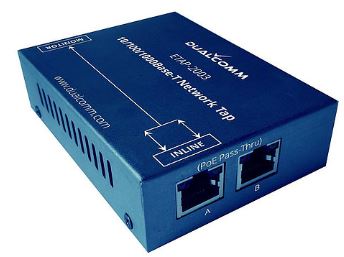 +
+
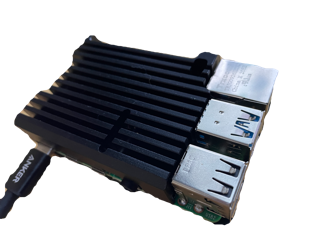
Aggregation Gigabit TAP + Rapsbery Pi4 (8GB+64GB MicroSD)
Aluminium Case + Customizable Cooling Fan+Dual Power supply+
Grace Shutdown + Customizable SW and three LED
10/100/1000MBASE-T network tap with PoE passthrough +
Raspberry Pi 4 (8GB RAM + MicroSD64GB) +
Aluminum case + Customizable cooling fan + Redundant power supply
+ Safety shutdown mechanism + Customizable switch and LED
↓
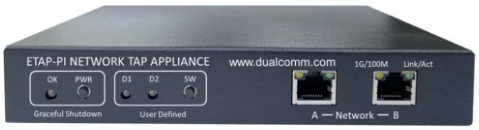
ETAP-PI Rapsberry Pi Network TAP Appliance
Raspberry Pi 4 network appliance ETAP-PI
Ideal for highly reliable NSM (Network Security Monitoring)/NIDS/NIPS
Create your own NSM devices with Suricata using Dualcomm’s ETAP-PI, network tap appliance
(PDF)
Movie
(Youtube)
DualcommInc.ETAP-PIで作成するSuricata NSMアプライアンス
(Japanese/Youtube)
Duaslcomm's Raspberry Pi network appliance ETAP-PI is an all-in-one device that integrates
compact portable network tap (10/100/1000BASE-T) and
Raspberry Pi 4 into one device.
In addition to packet capture, by installing various network monitoring and cybersecurity applications such as IDS/IPS on the RapsberryPi Module, you can build inexpensive and easily portable solutions and platforms.
The ETAP-PI network tap appliance connects
inline to network devices, captures traffic between devices in both directions, and sends the captured traffic to the
Raspberry Pi module.
On the Raspberry Pi side, analysis can be performed independently by preparing capture tools such as tshark/tcpdump,
big data analysis tools such as ErasticSearch, Kibana, and Grafana,
visualization tools, AI (machine learning) tools, and IDS/IPS
such as Suricata and Snort.
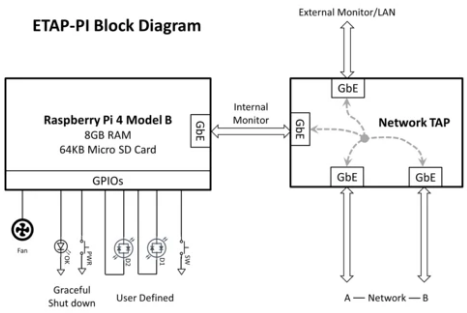
ETAP-PI has a capture port as well as an independent
external LAN and monitor port.
This port can be used to configure the Raspberry Pi headless.
In addition, the external LAN port copies and outputs the
traffic between port A and port B connected inline. Therefore, you can use the external LAN port
simply as another external monitor port
by connecting a capture device and simply using it as a tap.
Since the external LAN port is independent, you can also use ETAP-PI simply as a network tap without using the Raspberry Pi function.
ETAP-PI also has a temperature-controlled and customizable built-in cooling fan.
This fan operates at a user-defined temperature (default 65 degrees Celsius).
You can also customize the push button and 3 LEDs.
The cooling fan, push button, and LED are wired to the Raspberry Pi's GPIO and can be easily accessed from the
program.
ETAP-PI front
In addition, a power switch is provided separately, and in order to avoid problems caused by easily turning off the power, it is equipped with a safety shutdown mechanism and an LED to confirm grace shutdown.
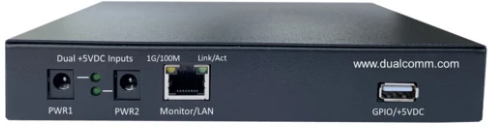
ETAP-PI back